
Communications Section Overview
The communications section is where you will find all correspondence that is sent to you by state government/tax agencies and is managed by Middesk on your business’s behalf.
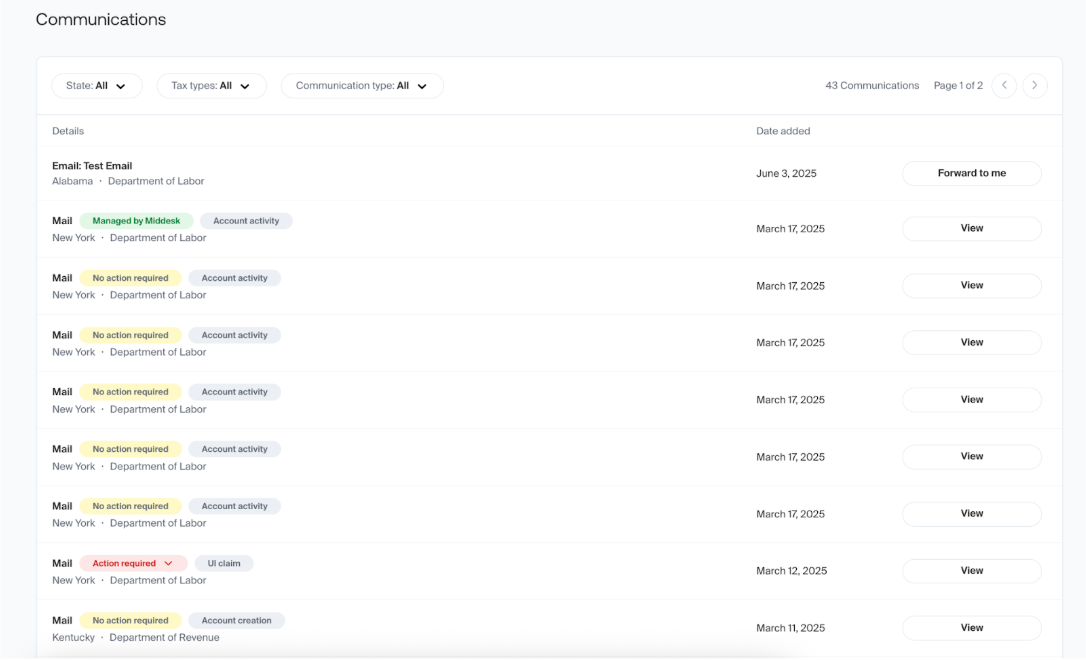
Email Communications
Middesk uses special “middesk-managed” or "midmail" email addresses that are formatted for your business when signing up for online tax agency accounts on your business’s behalf. These email addresses will display all messages received here in the communications section.
This allows for Middesk to retrieve and provide tax information, as well as assist with any account credential issues or password resets. Within the communications section, you can review emails that come in, and using the button on the right, forward them to yourself for review.
If you ever believe an email is not coming through that should be, or are having any issues with forwarding emails in the communications section to yourself, please contact our support team for assistance at agent@middesk.com.
Virtual Mail
Middesk’s virtual mail service eliminates the time-consuming process of processing physical mail. As an ongoing benefit, Middesk scans and stores each piece of mail sent to you from government agencies. Our team tags each piece of mail with the appropriate category and flags whether the item requires the business to take action. We also extract key tax-related information and store it in your Middesk account for easy access later.
Virtual Mail Statuses
You will see one of the following statuses assigned to your incoming virtual mail:
Action required: This status indicates that the employer must take action related to the information in the piece of mail.
No action required: This status indicates the employer does not need to take action on the information in the piece of mail. This status is also used for scam messages that our team detects.
Managed by Middesk: This status indicates that the Middesk team will be taking action on any required steps contained in the piece of mail. The agency involved has likely requested some action be taken, but in these cases that action can be taken by our team without needing customer input.
To learn more about Middesk’s virtual mail service, please consult the ‘Virtual Mail’ section of the Middesk Agent help center or reach out to our support team at agent@middesk.com